
Data Connectivity
Network Setup
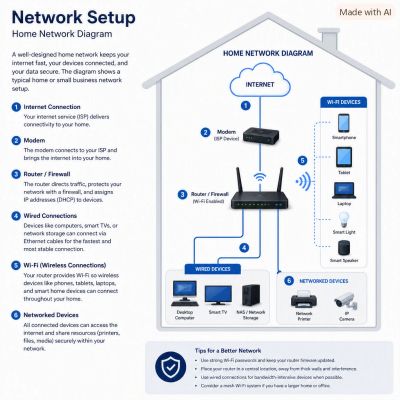
Network Setup (Home & Small Business) A reliable network is the backbone of both a modern home and a small business. The core idea is the same in both environments: create a fast, secure, and scalable system that connects your devices to the internet and to each other. The difference is that small businesses typically need stronger security, better hardware, and room to grow.
🧩 Core Components You Need
- Modem/ONT — Connects your location to your ISP.
- Router — Directs traffic, assigns IP addresses, and protects your network.
- Firewall — Often built into business‑grade routers; filters harmful traffic.
- Network Switch — Connects wired devices like PCs, printers, and VoIP phones.
- Wireless Access Points (WAPs) — Provide Wi‑Fi coverage across your space.
- Cabling (CAT6 recommended) — Ensures fast, interference‑free wired connections.
Home networks often combine several of these into one device. Small businesses benefit from separating them for performance and security.